



Description
 View the original course outline
ESXLab’s vSphere 8.0 Lab Guide comes from our powerful 5-day class is an intensive introduction to VMware vSphere™ 8.0 including VMware ESXi™ 8.0 and vCenter™ 8.0. This course has been completely updated to reflect the most recent changes introduced in vSphere 8.0.
Assuming no prior virtualization experience, our Lab Guide with the basics and rapidly progresses to advanced topics. It starts with the basic including installing, configuring and networking ESXi hosts. creating VMs, installing and configuring vCenter. It continues on by covering Virtual Machines, Permissions, storage, compute resource management, VM migration, building load balanced and failure recovery clusters, and more. Throughout the course best practices are provided, along with troubleshooting tips, and administrative short cuts.
Our Lab Guide starts with detailed instructions on how to install and configure ESXi 8.0 onto a PC server. Our Lab Guide then moves on through shared storage, networking, building VMs and centralized management. Additional labs explain step-by-step how to configure vSphere for rapid VM deployment, hot-plug virtual hardware, permissions, alarms resource management, VM high availability clusters, VM load balanced clusters, VM cold, hot and storage migration, updating / upgrading ESXi hosts and performance.
For a more detailed look at our Lab Guide’s content, use the Look Inside link (above) to see the first 5 chapters. Or use the Download free sample link to review the first 5 chapters and four labs of this course.
Hands On Labs
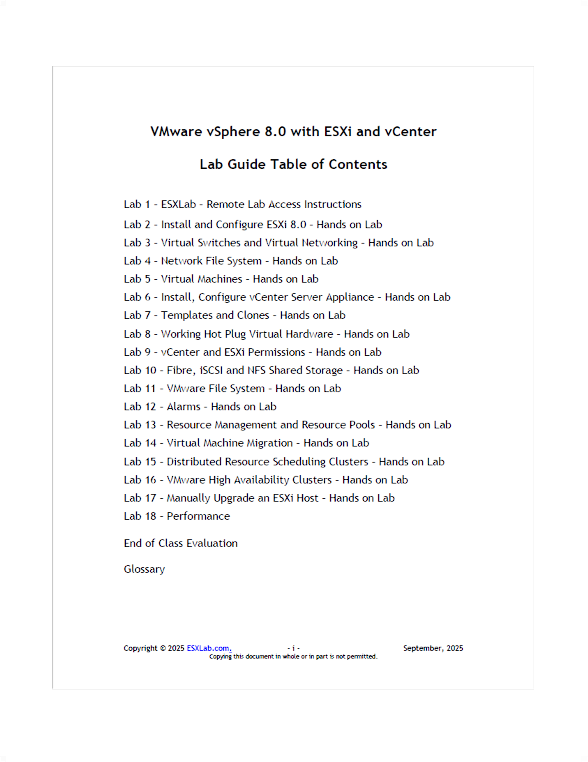
Our Lab Guide includes detailed step-by-step instructions on how to complete the following major hands on lab tasks:
- Connect to your dedicated Remote Lab environment
- Install ESXi 8.0, and perform post-install configurations
- Create, update Standard vSwitches. Use pNIC Teams for performance and redundancy
- Define, connect to and browse NFS based datastores
- Create a Virtual Machine and install a guest OS into the VM
- Install VMware Tools into a VM. Add 3rd party tools and utilities into a VM
- Export a VM in Open Virtual Machine Format (OVF) and then re-import it back into ESXi
- Install and configure the vCenter Server Appliance (vCSA)
- Configure vCSA Single Sign On (SSO) identity sources including Active Directory
- Configure vCenter’s inventory views to organize inventory objects
- Import ESXi hosts into vCenter management
- Work with VM Clones and Templates. Convert a VM into a template
- Rapidly deploy new VMs from template
- Perform ad-hoc VMs rapid deployments using VM cloning
- Rapidly deploy VMs using Guest OS Customization Specifications
- Work with hot-add virtual hardware
- Hot add, and then grow, a secondary virtual disk
- Grow a Windows system disk and partition with no downtime
- Configure and test hotplug memory
- Hotplug a new virtual CPU package into a running VM
- Configure the Software iSCSI adapter. Scan for and review SAN based storage volumes
- VMware VMFS 6 – VMware’s cluster file system
- Grow VMFS volumes using LUN Spans. Growing volumes and their VMFS datastores
- Review and update VMFS properties including Space Reclaim
- Review and select the best VMFS multipath policy for optimal performance and reliability
- Work with vCenter permissions using stock and custom Roles
- Configure vCenter alarms to monitor select infrastructure objects
- Configure Alarm actions to Send SNMP traps to a trap receiver on high VM compute resource use
- Create and tune Resource Pools. Test Resource Pool compute resource delegations
- Cold Migrate VMs from one ESXi host and storage volume to another
- Hot VMotion migrate the running compute state of a VM from one ESXi host to another
- Hot Storage migrate the running disk state of a VM from one datastore to another
- Build and test an automated compute resource load balancing DRS cluster
- Create and configure a VMware High Availability cluster
- Manually fail a host and watch the cluster place and restart impacted VMs onto healthy hosts
- Set up VMware Lifecycle Manager to update/update ESXi hosts
- Perform an ESXi host Compliance Scan, review host non-compliance
- Use VLM to automatically upgrade an ESXi 7.0 host to ESXi 8.0
- Use VLM to upgrade a VM’s virtual hardware to ESXi 8.0 compatibility
Reviews
There are no reviews yet.